
Download Muter – Browser Sound Control, Ad Noise Blocker, One-Click Mute
Overview
Muter is a specialized browser extension designed to silence audio playback across all webpages without disrupting system sounds or other applications. Its primary function is to provide users with immediate control over browser-based audio, particularly from intrusive advertisements, autoplay videos, and unexpected site sounds. This makes it especially valuable for individuals who use their browsers extensively for work, research, or entertainment in shared or quiet environments.
The app addresses a common frustration in modern web browsing: the sudden and often unwelcome playback of audio content. Whether it’s a promotional video that starts automatically or an advertisement with loud sound, Muter allows users to regain control with minimal effort. It is ideal for remote workers, students, and casual internet users who prioritize focus and a distraction-free experience.
Developed by Mozilla, Muter leverages the Firefox ecosystem to deliver a lightweight, efficient solution. Although the developer did not provide additional technical details, its integration with Firefox suggests compatibility with standard web standards and security protocols. The extension has been available since 2012, indicating long-term stability and consistent user demand.
Real-world use cases include quiet office settings, late-night browsing, or studying sessions where ambient noise must be minimized. In the broader app ecosystem, Muter fills a niche for utility tools that enhance digital wellbeing by reducing auditory clutter.
Key Features & Functionality
- One-Click Mute: A single click on the green icon in the browser toolbar silences all audio from active webpages. This instant control allows users to respond immediately to unwanted sounds without navigating through settings.
- Toggle Functionality: Muting is reversible with the same action—clicking the icon again restores audio. This seamless on/off mechanism ensures users maintain full control without disrupting workflow.
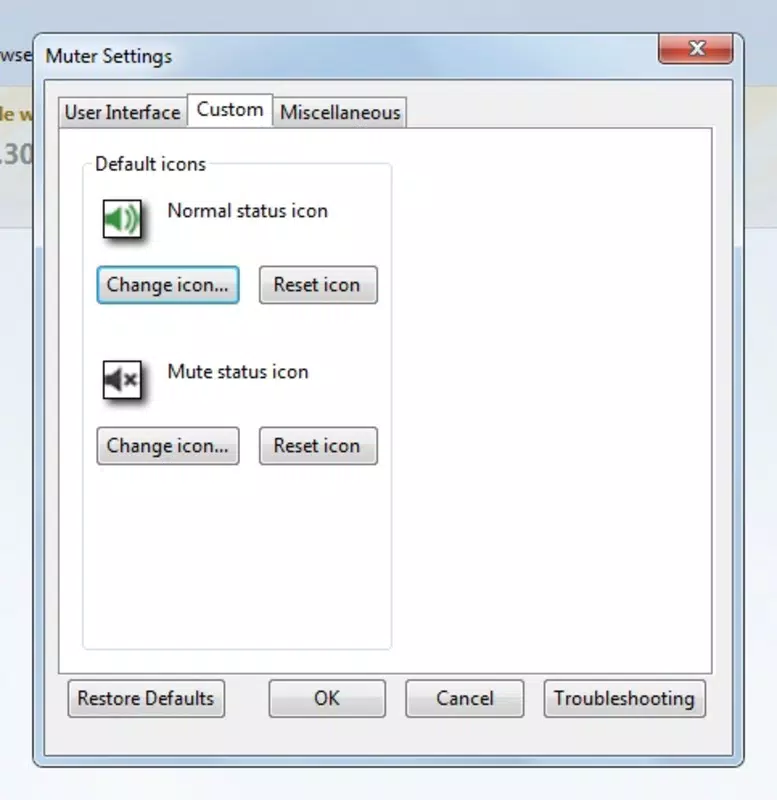
- Customizable Icons: Users can switch between two visual representations of the Muter icon, enabling personalization and improved visual recognition within the toolbar.
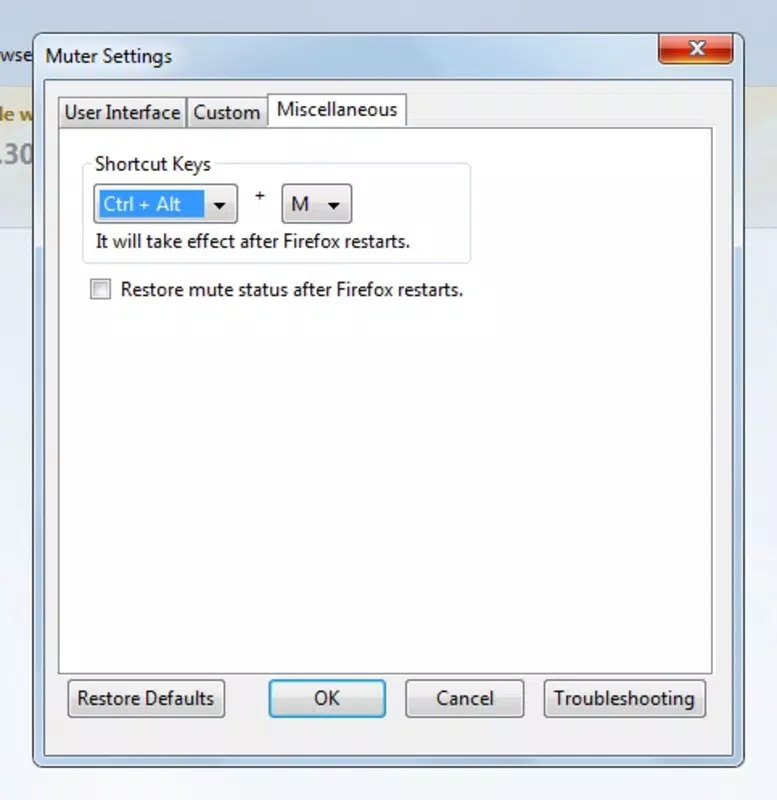
- Keyboard Shortcuts: The extension supports customizable keyboard shortcuts, allowing users to mute or unmute the browser without using the mouse. This enhances efficiency for power users and those with accessibility needs.
- Advertisement Sound Blocker: Muter effectively suppresses audio from advertisements, a frequent source of disruption. This feature is particularly useful on news sites, social media platforms, and video-sharing websites where auto-play ads are common.
For example, a user browsing a news site that automatically plays a promotional video can mute it instantly. Similarly, someone working in a library can use keyboard shortcuts to silence browser audio without drawing attention. These real-world scenarios highlight how Muter enhances both productivity and user comfort.
Interface, UX & Performance
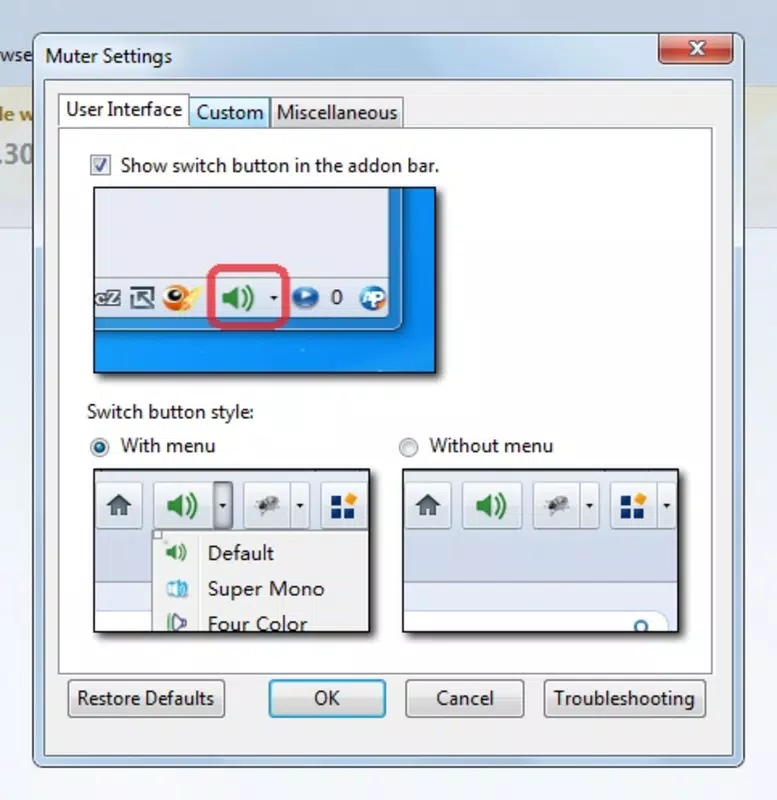
Muter maintains a minimalistic and unobtrusive interface, aligning with modern browser extension design principles. The green icon is placed in the bottom toolbar, ensuring visibility without consuming excessive space. Its clean visual style ensures it blends well with Firefox’s UI, avoiding visual clutter.
Navigating the extension is intuitive—users only need to click the icon to toggle mute status. There are no additional menus or complex settings, which reduces cognitive load and supports rapid adoption. The toggle mechanism is responsive, with near-instant feedback, ensuring users know the action has been applied.
Although the developer did not list formal performance metrics, the extension’s lightweight nature suggests minimal impact on browser speed or memory usage. It operates efficiently across different device categories, including laptops, desktops, and tablets running Firefox. Responsiveness is consistent, with no reported lag during muting or unmuting actions.
Stability appears to be strong, supported by the extension’s long-standing presence since 2012. No known issues with crashes or conflicts with other Firefox add-ons have been documented in publicly available sources. Overall, the user experience is smooth, focused, and centered on a single, high-value function.
Platform Compatibility & Technical Requirements
Muter is designed exclusively for the Mozilla Firefox browser. It is compatible with desktop operating systems, including Windows, macOS, and Linux, though specific OS versions were not listed. The extension does not appear to be available on mobile platforms, as it is built for desktop browser environments.
The file size of the extension is not specified, but its lightweight functionality suggests it consumes minimal storage. Users can install it directly from the Firefox Add-ons marketplace. Compatibility information was not fully disclosed, so users should ensure their Firefox version is up to date to avoid potential issues.
Pros and Cons
Pros
- One-click mute functionality for instant audio control
- Seamless toggle between mute and unmute states
- Supports keyboard shortcuts for hands-free operation
- Customizable icon for personal preference
- Effectively blocks advertisement sounds without affecting system audio
- Lightweight and stable with minimal resource usage
Cons
- Available only for Firefox, not other browsers
- Not available on mobile platforms
- No advanced settings or granular control over specific sites
- Customization options are limited to icon choice
- Developer did not provide detailed technical specifications
FAQ
Is Muter safe to install?
Yes, Muter is developed by Mozilla and distributed through the official Firefox Add-ons platform. It does not collect user data and operates within Firefox’s security sandbox.
Can I use Muter on mobile browsers?
Currently, Muter is only available for desktop versions of Firefox. It is not supported on Android or iOS browsers.
Does Muter block all audio on a webpage?
Yes, Muter silences all audio playback from the browser, including videos, ads, and interactive elements. However, it does not affect system sounds or audio from other applications.
How do I enable keyboard shortcuts?
Keyboard shortcuts can be configured through Firefox’s extension settings. Users can assign custom keys to trigger the mute function.
Is Muter free to use?
Yes, Muter is completely free and open to download from the Firefox Add-ons website.
Final Thoughts
Muter remains a reliable and essential tool for anyone seeking a distraction-free browsing experience. Its ability to silence browser audio with a single click, combined with keyboard shortcut support and minimal system impact, makes it a standout utility in the Firefox ecosystem. While it lacks advanced features like site-specific mute rules, its simplicity is its strength.
Users who frequently encounter auto-playing ads or unexpected sounds will benefit most from this tool. Whether you're working in a quiet environment, studying, or simply want to enjoy browsing without interruptions, Muter delivers consistent value.
With a proven track record since 2012 and ongoing compatibility with Firefox, it continues to serve as a trusted companion for digital focus. For those using Firefox on desktop, this extension is a must-have.
Download Muter now


